Base64 Encoding Explained: When to Use It, Why It's Not Encryption, and Common Misconceptions
What is Base64 Encoding?
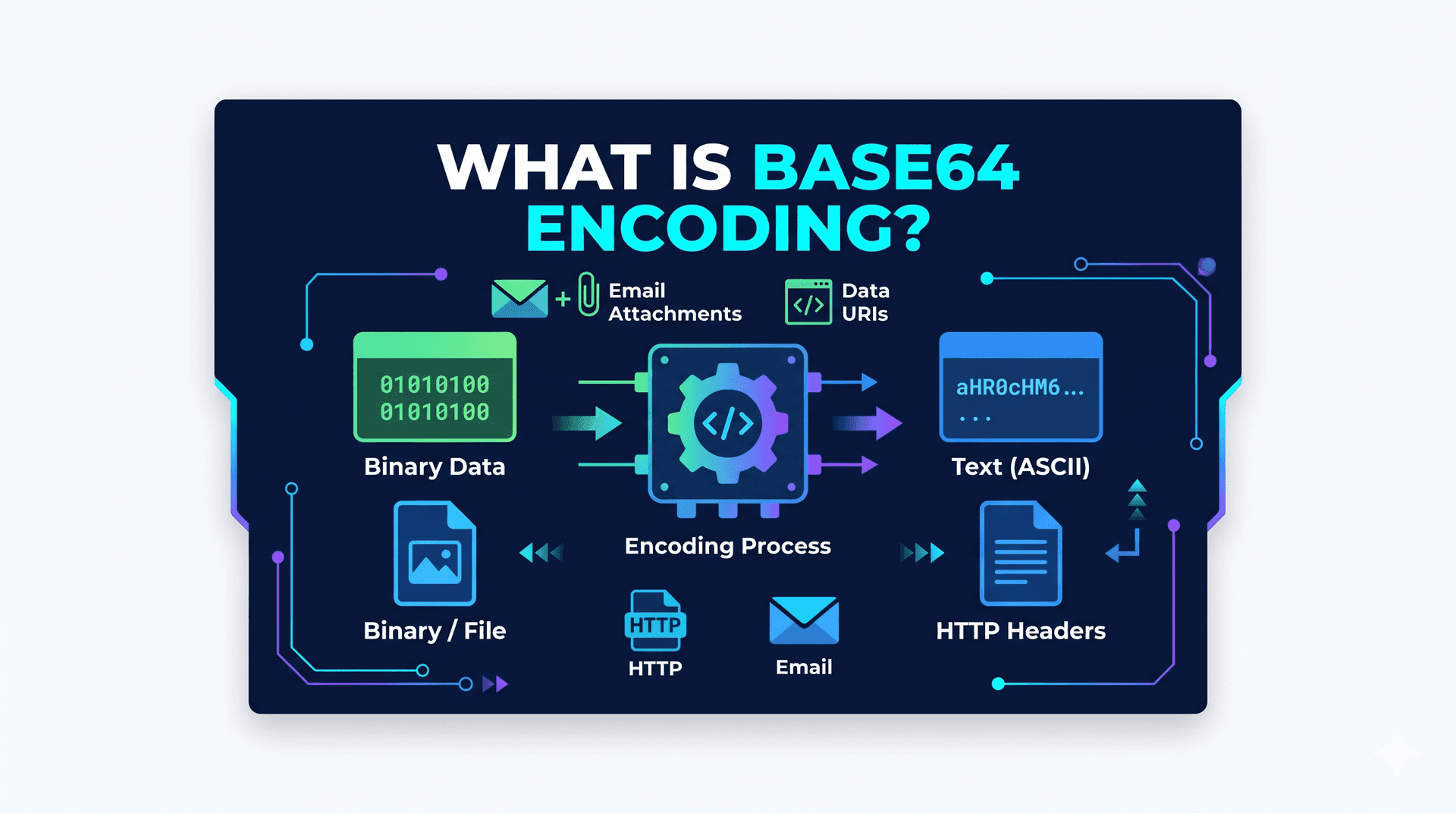
Base64 encoding is a method of representing binary data (like images, audio, or executable files) in an ASCII string format. Its primary purpose is to allow binary data to be transmitted reliably over systems that are designed to handle text, such as email protocols (like SMTP) or HTTP headers. By converting data into a standard set of 64 ASCII characters, Base64 ensures that the data remains intact and is not corrupted by character set differences or control characters that might be interpreted incorrectly by text-oriented systems.
This encoding scheme takes groups of three bytes (24 bits) from the binary input and converts them into four Base64 characters, each representing 6 bits. This process increases the data size by approximately 33%, as 24 bits of original data become 32 bits (four 8-bit ASCII characters). Despite this size increase, Base64 remains a widely used standard due to its effectiveness in ensuring data integrity across various transmission mediums.
How Base64 Encoding Works
The core principle behind Base64 is to map sequences of 6 bits to a specific character from its 64-character alphabet. This alphabet typically includes uppercase letters (A-Z), lowercase letters (a-z), digits (0-9), and two additional characters, usually '+' and '/'. A padding character, '=', is used at the end if the input binary data is not a multiple of three bytes.
Here's a simplified breakdown of the process:
- Group Bytes: The input binary data is read in blocks of 3 bytes (24 bits).
- Divide into 6-bit Chunks: Each 24-bit block is then divided into four 6-bit chunks.
- Map to Base64 Characters: Each 6-bit chunk, which can represent a value from 0 to 63, is mapped to a corresponding character from the Base64 index table.
- Padding: If the original data is not a multiple of 3 bytes, padding characters ('=') are added to the end of the encoded output. For example, if there's only one byte left, it will be encoded into two Base64 characters, and two padding characters will follow (e.g.,
A==). If there are two bytes left, they will be encoded into three Base64 characters, followed by one padding character (e.g.,AB=).
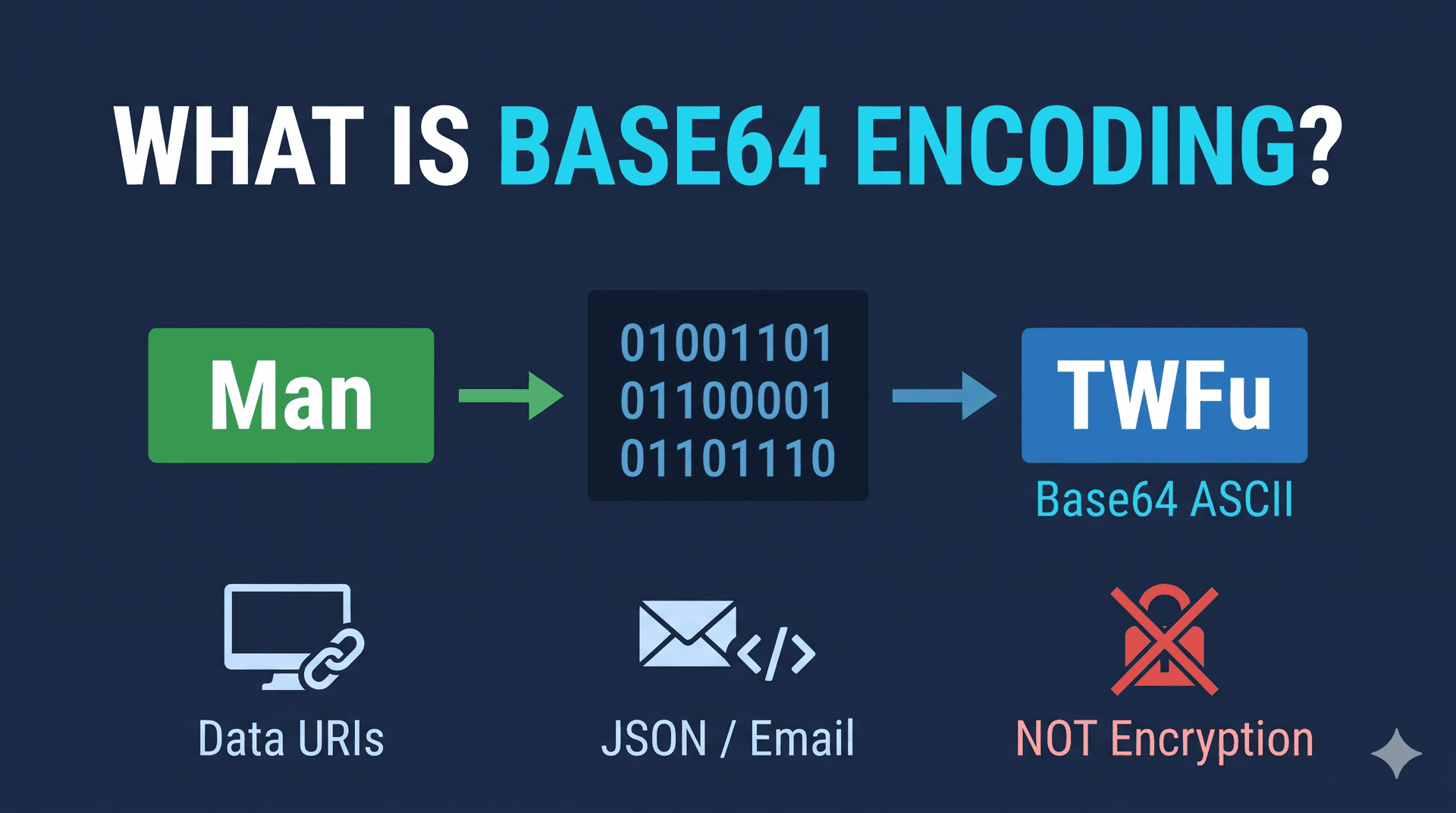
For example, if you encode the single ASCII character 'M' (which is 01001101 in binary), it would require padding. The 8 bits of 'M' are taken. Two zero bits are added to make it 10 bits (0100110100) and then split into 6-bit chunks: 010011 (19) and 010000 (16). These map to 'T' and 'Q' respectively in the standard Base64 alphabet. Since only one byte was input, two padding characters are added, resulting in "TQ==".
When to Use Base64 Encoding
Base64 encoding serves several practical purposes where binary data needs to be handled within text-based environments:
1. Transmitting Binary Data Over Text Protocols
Many legacy and modern protocols, like email (SMTP) or certain parts of HTTP, are fundamentally designed to handle text data. Binary data, if sent directly, can be corrupted or misinterpreted due to special control characters or character set mismatches. Base64 converts this binary data into a universally readable ASCII text string, ensuring safe transmission. This is common for:
- Email Attachments: Attachments are typically Base64 encoded before being sent as part of an email message body.
- HTTP Headers: Sending authentication tokens, session IDs, or small binary payloads that must reside in HTTP headers.
- JSON and XML Payloads: Embedding small binary objects, such as user avatars or file previews, directly within JSON or XML structures that primarily expect text.
2. Data URIs in Web Development
Web browsers can interpret Base64 encoded data directly within HTML, CSS, or JavaScript via data URIs. This technique allows developers to embed small files, such as images, fonts, or small audio clips, directly into the code itself, eliminating the need for separate HTTP requests to fetch these resources. This can slightly improve page load times for very small assets but significantly increases the size of the HTML/CSS file.
<img src="data:image/png;base64,iVBORw0KGgoAAAANSUhEUgAAAAUAAAAFCAYAAACNbyblAAAAHElEQVQI12P4//8/w38GIAXDIBKE0DHxgljNBAAO9TXL0Y4OHwAAAABJRU5ErkJggg==" alt="Red dot">3. URL Safety and Obfuscation
While not its primary purpose, Base64 can be used to make binary data safe for inclusion in URLs. Standard Base64 uses '+' and '/' characters, which have special meanings in URLs. A URL-safe variant replaces '+' with '-' and '/' with '_', and omits padding. This ensures that data passed as URL parameters or path segments doesn't break the URL structure. Furthermore, Base64 offers a very basic form of obfuscation, making data unreadable at a glance without being a security mechanism.
Why Base64 Is NOT Encryption
One of the most critical misconceptions about Base64 is that it provides a form of security or encryption. This is fundamentally incorrect.
Encoding vs. Encryption
- Encoding: The purpose of encoding is to transform data into a different format that can be easily consumed by different systems, often to ensure data integrity during transmission. Encoding is reversible using a publicly known algorithm, and anyone can decode the data without special knowledge or keys.
- Encryption: The purpose of encryption is to secure data, making it unreadable to unauthorized parties. Encryption relies on cryptographic algorithms and secret keys. Without the correct key, encrypted data should be computationally infeasible to decrypt, even if the algorithm is known.
Base64 is a straightforward encoding scheme. Its algorithm is public knowledge and involves a simple character mapping. Any encoded Base64 string can be easily converted back to its original binary form by anyone with access to the encoded data and awareness of the Base64 standard. There are no secret keys involved, and no cryptographic protection is applied.
Mistaking Base64 for encryption can lead to severe security vulnerabilities, as sensitive information might be thoughtlessly Base64-encoded and transmitted openly, believing it to be secure. For true data security, robust encryption algorithms (like AES or RSA) combined with proper key management must be used.
Common Misconceptions About Base64
Misconception 1: Base64 Reduces Data Size
Reality: Base64 encoding actually increases the size of the data. As explained, it converts every 3 bytes (24 bits) of binary data into 4 ASCII characters (32 bits). This means the encoded data will be approximately 33% larger than the original binary data. For example, a 100 KB image will become roughly 133 KB when Base64 encoded. This size increase can be a disadvantage, especially for large files or bandwidth-sensitive applications.
Misconception 2: Base64 Is a Compression Algorithm
Reality: Base64 has no compression capabilities. It is solely an encoding scheme for representation, not for reducing file size. Compression algorithms, in contrast, employ techniques to eliminate redundancy in data to make it smaller. Combining Base64 with compression would typically involve compressing the data first, and then Base64 encoding the compressed binary output.
Misconception 3: Base64 Provides Security or Obfuscation
Reality: As discussed, Base64 offers no security whatsoever. It's a transparent transformation. While the encoded output might look like gibberish to an untrained eye, it is trivially reversible. It provides a minimal level of obfuscation at best, only preventing casual inspection, but poses no barrier to anyone who knows what Base64 is. Never use Base64 to protect sensitive information.
Key Takeaways
- Base64 encoding converts binary data into a text-based ASCII string format for safe transmission over text-only systems.
- It increases data size by about 33% and is not a compression method.
- Common use cases include email attachments, HTTP header values, embedding small images in web pages (data URIs), and making data URL-safe.
- Crucially, Base64 is an encoding scheme, not an encryption method. It provides no security and is easily reversible. Do not use it to protect sensitive information.
- For actual data security, employ strong encryption algorithms.
Advertisement